A Halcyone Maker field guide
Put your own 3D model in a scene with a Halcyone character
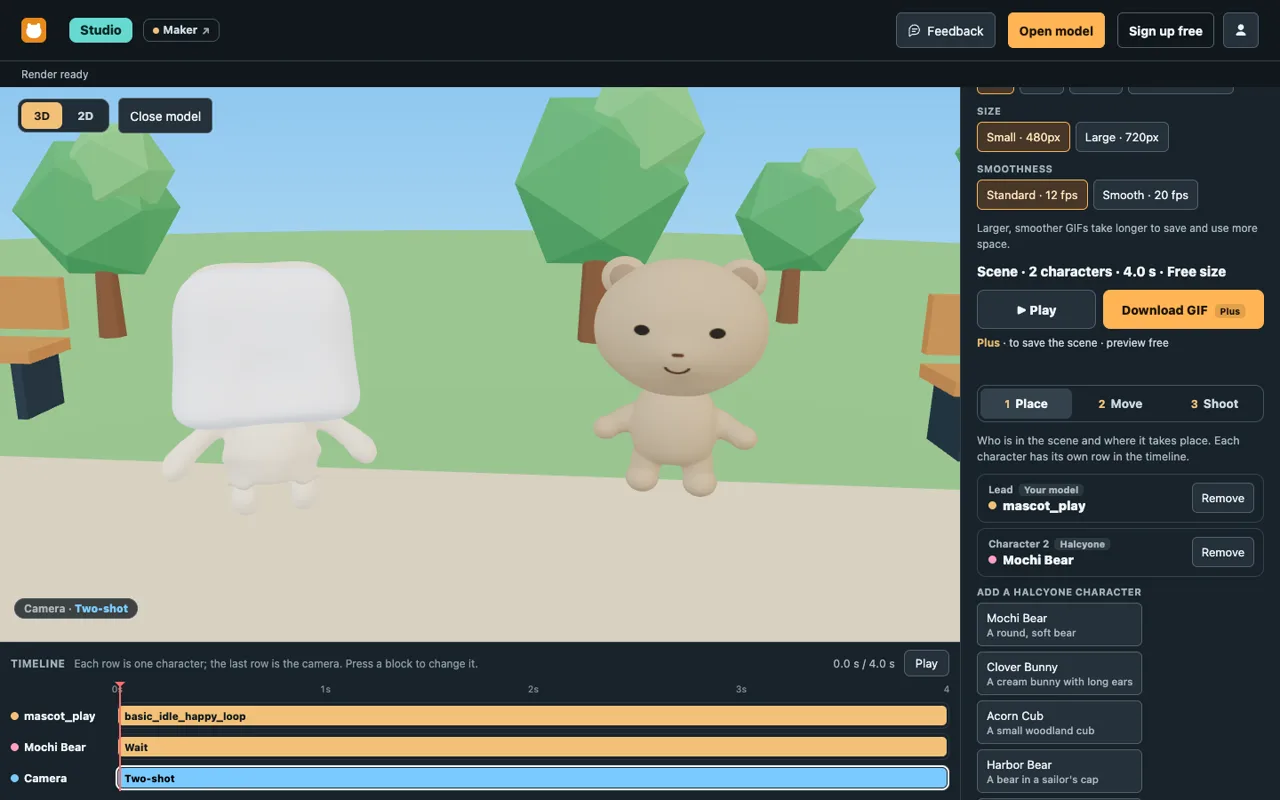
Put your model beside Mochi Bear on the Stage set. Each has a row in the Timeline, so you can time the bear’s wave to an animation in your file.
1. Start with Mochi Bear
Open the Honey Bear sample. In Record → Place, choose Start a scene under Make it a scene. Mochi Bear leads the scene. Under Set, choose Stage.
2. Bring your model onto the stage
In Your own files, find Second character. Press Add, then Choose file, and open your GLB, glTF or VRM. Its name appears beside Mochi Bear’s in the cast list and on its own Timeline row.
3. Choose a motion for each character
In Move, select your model under Who and edit its first action. The Action menu lists Walk to, Run to, Wait and Say, plus a Motion · entry for each animation in your file. Choose one of those motions, or choose Wait to stay in place: the model plays its idle animation if it has one, otherwise the motion you chose for it. Stay still holds the model without any motion. A motion plays where the character stands, even one made to move the model; Walk to and Run to take it somewhere.
Select Mochi Bear under Who. Set the bear’s first action to Wave and set Facing to your model.
4. Frame the pair
Click the first block on the Camera row and choose Two-shot. Under Between, select Mochi Bear and your model. Play from the start to check the greeting.
Questions
Can my file be the lead character?
Yes. Open your GLB, glTF or VRM in Studio first. It appears in the Character slot in Place, where Replace lets you choose another file. Start a scene, then choose a partner under Add a Halcyone character. A scene holds up to four characters.
Why does my model glide when I choose Walk to?
Walk to moves the model to the chosen spot. If the file has no walking animation, it glides. Your model uses its own animations. Gestures such as Wave are available on the Halcyone character’s row.