A Halcyone Maker field guide
Open and view a VRM file online, then save a picture or a clip
VRM is a file format for humanoid avatars, built on glTF. If you only want to look at a .vrm file, check it before using it somewhere else, or get a picture of it, you can open it in the browser. You can inspect the avatar and any animation clips stored in the file here. For spring-bone physics and VRM expressions, use a VRM-aware viewer.
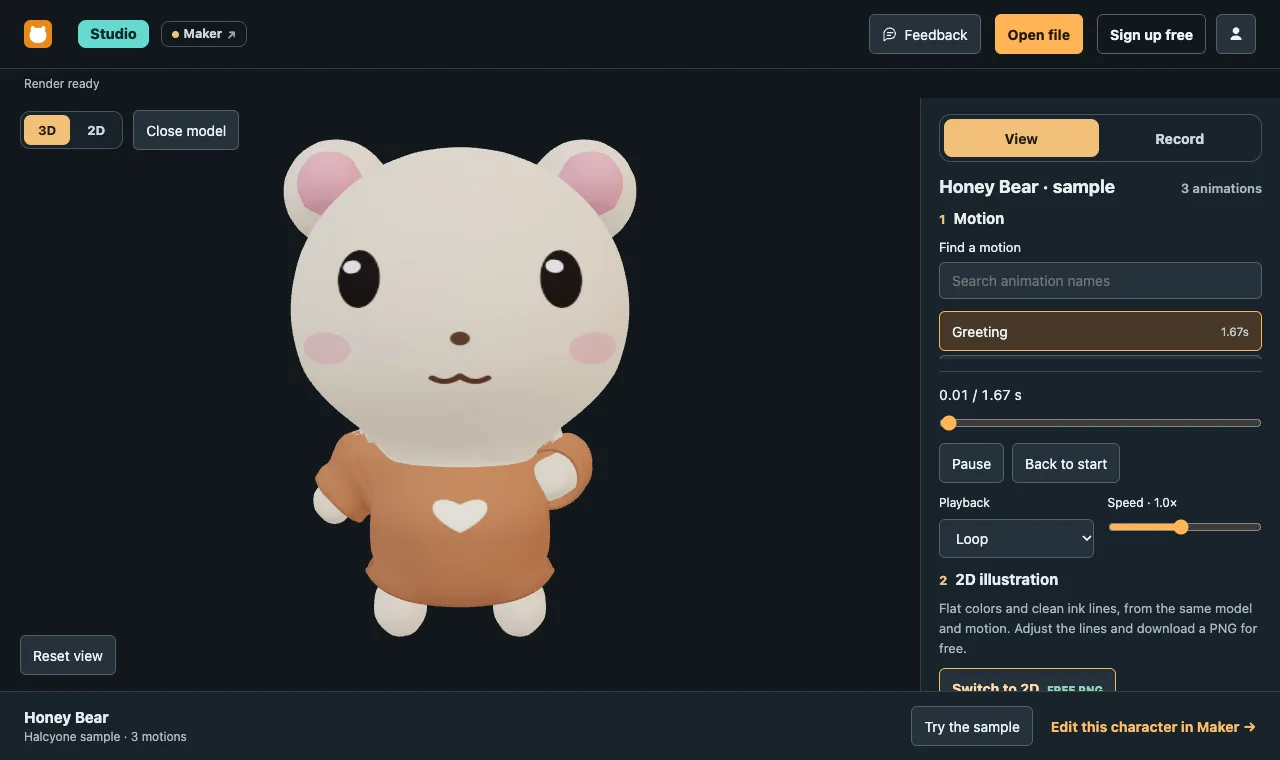
1. Open the .vrm file
Go to the GLB viewer and press Open a file, or drag the .vrm onto the page. A VRM is normally a single file, so there is usually nothing else to select.
The avatar is drawn in the pose stored in the file. Drag to orbit, scroll to zoom and right-drag to pan. Reset view fits the avatar in the view again.
2. Check for motion
The View tab lists the animations stored in the file. A VRM avatar usually carries none; the panel then says No animations in this file and offers Still and One turn. One turn spins the avatar so you can see it from every side.
If your VRM does contain animation clips, they are listed under Motion with their lengths, with the same timeline, Loop or Play once, and Speed controls as any GLB.
3. Save a 2D picture for free
Switch the look from 3D to 2D. The avatar is redrawn in flat colors with ink lines. Line sets the line weight, Inner the lines inside the model, and Color the ink.
Choose a PNG background (Transparent, White or Color) and a PNG size (1024 px or 2048 px), then press Download 2D PNG · Free. A transparent PNG is trimmed to the avatar. No account is needed.
4. Record a turntable or a still of the 3D look
Switch the look back to 3D, then open the Record tab; the look you leave selected is the one that is saved. Choose a Shape (Square, Vertical, Wide or Free size), a background in the Place step and a light in the Shoot step, and turn on One turn in the Move step so the avatar rotates once over the take.
Choose GIF, MP4, WebM or PNG of the shot under Format and press the Download button. Previewing the shot is free; saving it requires Plus.
What the viewer does not do with a VRM
The viewer reads a VRM as the glTF model it contains. It does not apply VRM's own features: expression presets, spring-bone hair and cloth movement, look-at, or MToon toon shading. Materials are drawn from their standard glTF values, so the avatar can look different from how a VRM app shows it.
It does not load separate animation files, does not track your face or body, and does not edit or re-export the VRM. Halcyone Maker's own characters are not VRM either: the Maker has no VRM export.
If the VRM does not open or looks wrong
The viewer says the file could not be read: the file may be incomplete. Export it again from the tool that made it, or try another copy.
The avatar looks different from a VRM app: if it uses MToon, the viewer draws its standard glTF materials instead. Also check the selected look and light. For a flat-color picture, switch the look to 2D.
A dark avatar is hard to see: in the Record tab choose a White background, and under More light options raise Brightness.
The page reports that 3D rendering is unavailable or lost: the viewer needs WebGL 2. Close other 3D tabs or try a computer; a detailed avatar can exceed a phone's memory.
Formats, and what is free
The viewer opens .vrm, .glb and .gltf files. Opening, viewing and the 2D PNG of the avatar you opened are free with no account.
GIF, MP4, WebM and PNG of the shot from the Record tab require Plus ($12/month or $115.20/year). The file is read in your browser and is not uploaded. Check the license of an avatar you did not make before publishing pictures of it.
Questions
Can I open a VRM file without installing an app?
Yes. The GLB viewer opens .vrm files in a browser with WebGL 2. Choose the file or drop it on the page.
Does the viewer play VRM expressions or hair physics?
No. It draws the model and plays any animation clips stored in the file. Expression presets, spring bones, look-at and MToon shading are not applied.
Can I get a transparent PNG of my VRM avatar?
Yes. Switch the look to 2D and press Download 2D PNG · Free for a transparent 2D illustration. A PNG of the 3D shot is saved from the Record tab with Plus.
Is my VRM uploaded?
No. The file is read and drawn locally in your browser.