A Halcyone Maker field guide
Animate a conversation between two 3D characters
Mochi Bear has been waiting on the wrong street. Clover Bunny knows it. Give each friend one line and let the camera catch Clover Bunny’s face just before the reply.
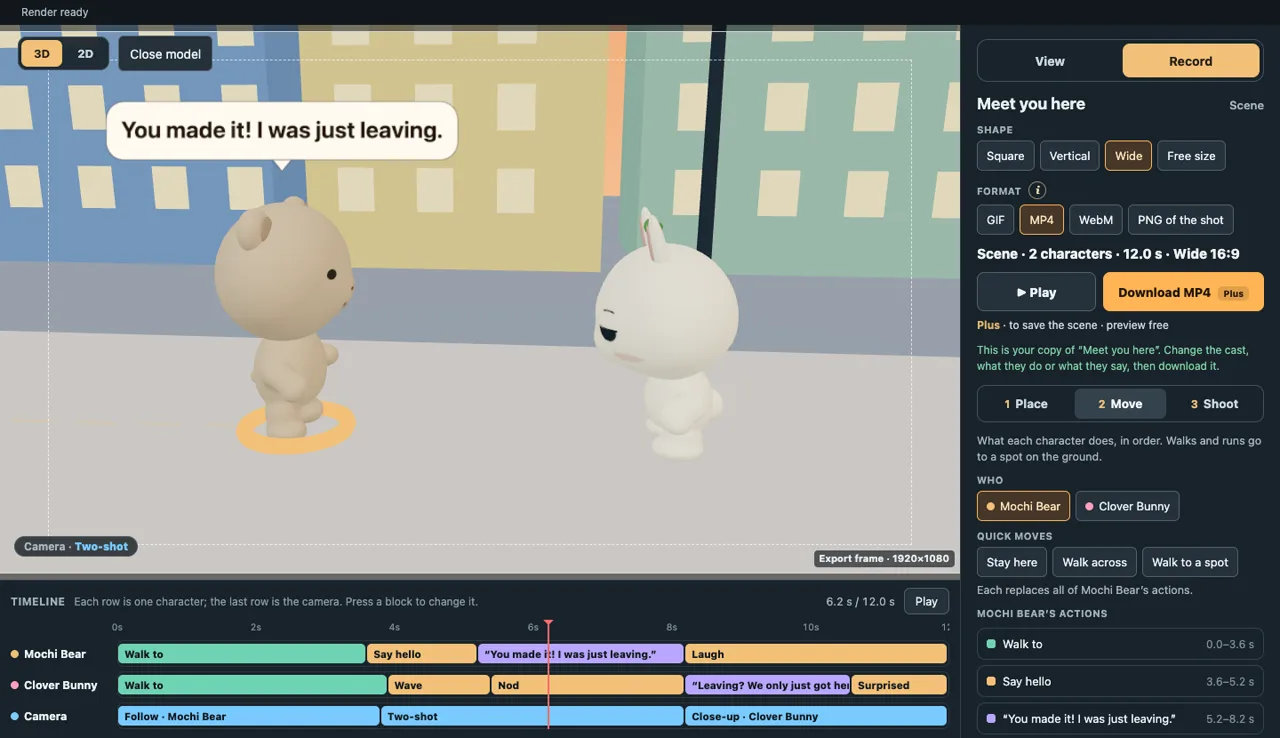
1. Bring the friends onto Street
Open the Honey Bear sample. In Record → Place, choose Start a scene under Make it a scene. Mochi Bear takes the lead because the sample has no walking animation. Choose Clover Bunny under Add a Halcyone character and Street under Set. Both names now have rows in the Timeline above Camera.
2. Give Mochi Bear the question
In Move, choose Mochi Bear under Who and press Stay here. Click the Timeline ruler at three seconds, then choose + Add an action at 3.0 s to split the Wait. Open the first band, set Action to Say and type “Is this our stop?” in Line. Set Facing to Clover Bunny. Set the second band to Surprised.
3. Leave room for Clover Bunny’s answer
Select Clover Bunny under Who and press Stay here. Set Facing to Mochi Bear on the Wait. Click the ruler at the end of Mochi Bear’s question and use + Add an action at the displayed time. Set Clover Bunny’s new action to Say, set Facing to Mochi Bear and enter “It was the last one.” The reply now starts when Mochi Bear reacts.
4. Cut to Clover Bunny for the reply
Click the first block on the Camera row and choose Two-shot. Under Between, choose Mochi Bear in the first selector and Clover Bunny in the second. Click the ruler at the start of Clover Bunny’s line, then + Cut to a new shot at the displayed time. Choose Close-up with On set to Clover Bunny. Play from the start and watch who is on screen when the answer appears.
Questions
Why do both speech bubbles appear at once?
The two character rows play together, and a character’s last action lasts to the end of the scene. Where the reply starts, add a Wait to Mochi Bear’s row, then remove the part of the question left after that Wait, so the question ends as the reply begins.
Where do I type the words?
Choose Say in Action. Type the words in Line. They appear in a speech bubble in the preview and the saved file. Say hello plays a greeting gesture.