Cute 3D mascots that actually move
Every scene above is the same kind of character doing a different job: striking a ball on a pitch, presenting at a board, reacting to your app's UI states. Pick a cast member and it performs all of them, because they share one rig and one motion library. Generative 3D tools hand you a static mesh and leave the hard part — making it move without breaking — to you.
Build your own character in a browser, give it a motion, and take away both the model and the video.
Make your own mascot →Five things a 3D mascot can do for you
Each one is a real scene on the stage above, built from ready-made clips.
Soccer: a 3D character that dribbles, shoots and celebrates
This is the same cute 3D mascot you build in the maker, dropped into a soccer pitch and told to perform. It settles into a ready stance, dribbles the ball toward the goal, strikes it on the clip's authored contact frame, and slides on its knees to celebrate — four ready-made motions played back to back, with the ball synced to the foot rather than to a timer. If you are prototyping a sports game, cutting football content, or need a soccer 3D character for a thumbnail, you can pick a character, watch it move, and export the model or record the clip. No rigging, no keyframes, nothing to break.
Presenter: a talking 3D mascot for explainer videos
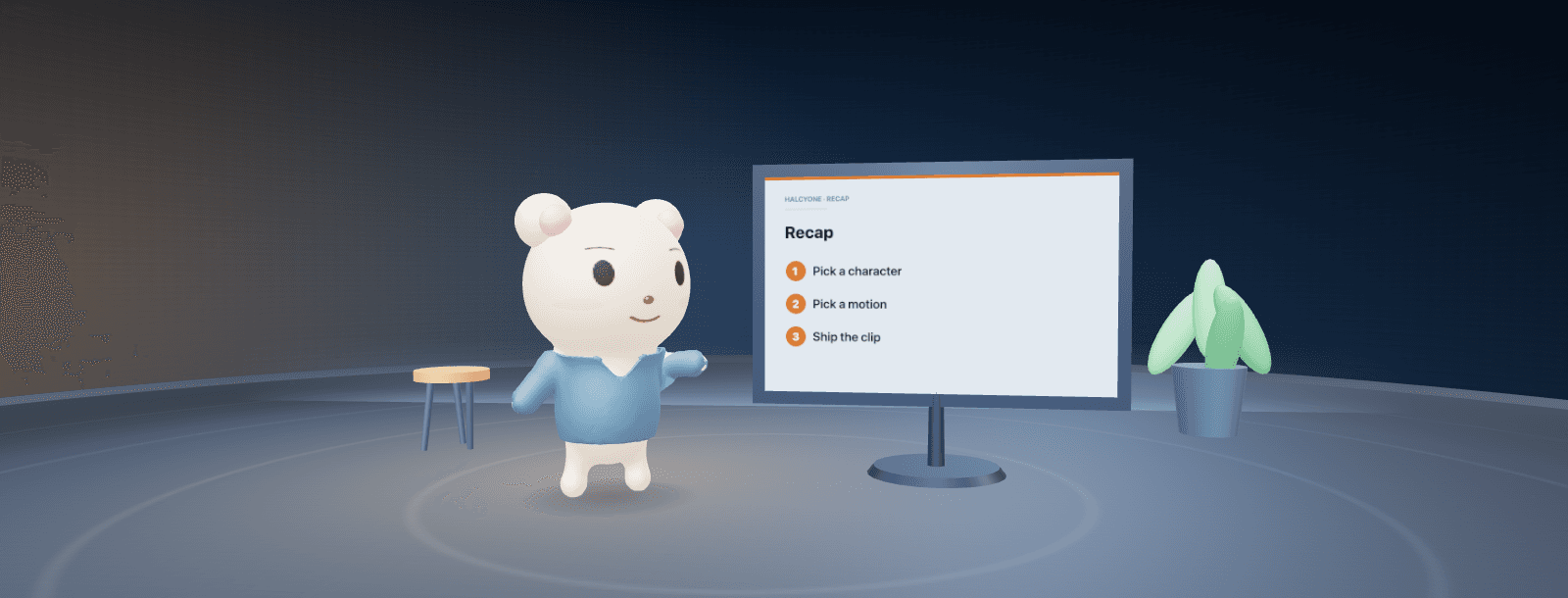
Point a camera at a mascot and it has to do something. Here the character opens with both hands, lights up the first bullet, turns to the screen as the slide flips to a chart, counts a three-point recap on the beat, then holds on the board. Every slide change is pinned to a frame of the animation rather than a timer, so the gesture and the screen land together. In the maker the same character can lip-sync to your voice or an audio file, so the mouth follows narration you already recorded. Record the take as video with a transparent background for the corner of a screen capture, or export the model and stage it yourself.
App mascot: loading, success, error, try again
Loading, saved, failed, try again, done — every product ships the same handful of states, and each one reads better with a character in it. Here the mascot waits through an upload, throws its arms up when it saves, recoils when the request fails, pumps a fist on the retry, then celebrates when the queue clears. The phone beside it changes on the exact frame of the gesture, because the card state is fired by the animation rather than by a timer. Build a mascot in your own brand colours, then record each state as a short clip with a transparent background for onboarding, empty states and push notifications — or export the model and drive it yourself.
Game mascot: start, jump, collect, combo, level clear
Prototyping a game is mostly waiting on a character. This scene runs the loop you need first: a ready pose, three jumps that pop a coin at each apex, a combo hold, a level-clear beat and a victory dance — every coin timed to the real airborne frame of the clip rather than to a stopwatch. Build the character in a coffee break, then export it as a GLB with the animations baked in and drop it straight into Unity, Unreal, Godot or three.js. Every character shares one rig, so swapping the hero later does not break your animator or your code. Generative 3D hands you a mesh; this hands you something that already moves.
Dance: a looping 3D character for shorts, streams and overlays
Short-form video eats looping motion. This scene puts a cute 3D character on a club stage and runs five ready-made moves back to back — a groove, a floss, a jump spin with confetti, a sing-along and a mic drop — while the spotlights recolour on every beat. Each loop is authored to return to its own first frame, so you can trim any section and it still tiles cleanly under music, and the spin is held for whole turns so it always lands facing the camera. Swap the character without losing a beat, then record a transparent WebM or a GIF for a stream overlay, a Shorts corner or a sticker set.
The cast
Six curated characters. Any of them can play any scene — swap them in the row above the stage.
Soft Friends
Long ears, clean off-white body — the easiest character to read at small sizes.
🐻 Honey BearSoft Friends
A cosy hoodie bear with round proportions. The friendly default for explainers.
🦊 Citrus FoxPop Pals
Tall, glossy and sharp-eared — the athletic one. Built for sports and game beats.
🍡 Marshmallow CatSoft Friends
A wide-eyed pocket cat with a pearl finish. Sweet, plush, very sticker-able.
🎤 Presenter BearSmart Mascots
Clean suit, calm face, camera-safe contrast. Made to stand next to a slide.
✨ Pop BeanPop Pals
No animal parts at all — hair-led and flat-shaded, for app and UI mascots.
Questions
What the stage is, and what you get to keep.
What am I actually looking at?
A live 3D scene running in your browser, not a video. The character is a real model from the Halcyone Maker character maker, playing ready-made animation clips on a shared rig. Drag to orbit, tap to replay the performance, and switch the character with the cast row.
Can I use my own character in these scenes?
Yes. Every character you build in the maker uses the same rig, so it can play every motion you see here. Pick a cast member, hit "Make this character" and it opens in the maker ready to edit.
Why do generated 3D characters break when you animate them?
Text-to-3D tools output a mesh with no rig, so an auto-rigger has to guess where the joints are — arms detach, faces smear, legs bend the wrong way. Halcyone starts from a rigged character and only changes proportions and styling, so every motion in the library keeps working.
Can I export the character and the animation?
Yes. Export a GLB with the rig and animations included for Unity, Unreal, Godot, three.js or Blender, or record the performance as video, GIF or transparent PNG frames straight from the maker.
Do I need Blender or any 3D experience?
No. The maker runs in a browser: choose a look, adjust colours and proportions with sliders, pick a motion, and record or export. There is no rigging, no weight painting and no animation timeline to learn.
Can I use this soccer 3D character in a game?
Yes. Export the character as a GLB with its animations and drop it into Unity, Unreal, Godot, three.js or Blender. The rig and the motions come with it.
Can the mascot lip-sync to my voice?
Yes. In the maker's Studio tab you can load an audio file or speak into the mic and the mouth follows it, then record the take as video.
Can I get these app states as transparent video?
Yes. Pick the character and the motion in the maker's Studio tab and record the take — the video comes out with a transparent background, so it drops straight into an onboarding screen or an empty state.
Can I use this 3D game mascot character in my own game?
Yes. Export the character as a GLB with its animation clips and import it into Unity, Unreal, Godot, three.js or Blender. Every character you make shares the same rig and the same clip names, so you can swap the hero without touching your code.
Can I get a dancing 3D character as a transparent loop?
Yes. Every dance clip here is loop-perfect, and the maker records the character on a transparent background as WebM or GIF, so it drops straight into a Shorts corner or a stream overlay.
Your turn
Start from one of the cast, change the colours, the ears, the outfit and the face, then give it a motion. Export a GLB you own, or record a clip with a transparent background.
Open the character maker →